


RPM alert fatigue is what happens when a remote patient monitoring program sends clinicians more alerts than they can meaningfully review. Most of those alerts come from single readings, device errors or missed uploads rather than real changes in a patient's condition.
As a program adds patients, the noise grows faster than the staff. Nurses start clearing alerts in bulk, and the few that matter wait in the same queue as the rest. This article explains where the noise comes from, which rules shape alert software, and how a staged pipeline cuts it down.
What is RPM alert fatigue?
Fixing a noisy RPM alert queue?
Agnotic builds RPM apps and nurse dashboards with capture checks, patient baselines, tiered routing and EHR summaries.
RPM alert fatigue is the overload and desensitization clinical staff experience when remote patient monitoring software raises too many low-value alerts. When most alerts need no action, nurses review them faster and less carefully, and a real decline in a heart failure or hypertension patient can sit unnoticed among them.
Why do default thresholds produce so many alerts?
Default vendor rules usually compare each reading against one population cutoff. That design treats every number as equally meaningful, which it is not.
- Single readings: One high blood pressure taken right after climbing stairs fires the same alert as a sustained rise over three days.
- Device artifacts: A pulse oximeter on a cold or moving finger reports short drops. A scale on an uneven floor logs weight jumps.
- No patient baseline: A patient whose usual oxygen saturation sits below the population cutoff alerts every day, even when stable.
- Mixed queues: A missed upload or low battery lands in the same queue as a clinical change, so technical tickets bury clinical ones.
- Medication changes: After a dose change, readings may take days to settle, and a naive rule alerts on the same value every morning.
- Duplicate readings: Patients who retake a reading three times in a row create three alerts for one event.
Which billing and FDA rules shape alert design?
Alert software touches billing, device regulation and security. These rules decide what the software must log and how far its logic can go.
- RPM codes for 2026: Under the CY 2026 Physician Fee Schedule final rule (CMS-1832-F), 99453 covers setup, 99445 covers device supply for 2 to 15 days and 99454 for 16 to 30 days. Treatment management is 99470 for the first 10 minutes, or 99457 for the first 20 with 99458 for each additional 20.
- Device and data: CMS guidance in MLN901705 says the RPM device must meet the FDA definition of a medical device and must upload physiologic data digitally, so patient-typed readings do not count toward device days.
- FDA Criterion 1: FDA's Clinical Decision Support Software guidance (issued 6 January 2026, re-issued 29 January 2026) excludes from non-device CDS any software that analyzes a pattern or signal from a signal acquisition system. Trend logic over repeated device readings can fall inside that exclusion, so showing the rule to the clinician does not by itself keep the alert engine out of device territory.
- Audit controls: The HIPAA Security Rule at 45 CFR 164.312(b) requires mechanisms that record and examine activity in systems holding ePHI. Threshold changes, acknowledgments and dismissals are that activity.
- EHR access: The 170.315(g)(10) FHIR API is for reading data. Filing a monthly summary or escalation note into the EHR needs the vendor's write APIs or an HL7 v2 ORU or MDM interface.
For billing, the 2026 codes change alert design in a practical way. A month with as few as 2 days of data and 10 minutes of management can now be billed, so the software needs to count days and minutes accurately from the first reading.
How does a four-stage alert pipeline work?
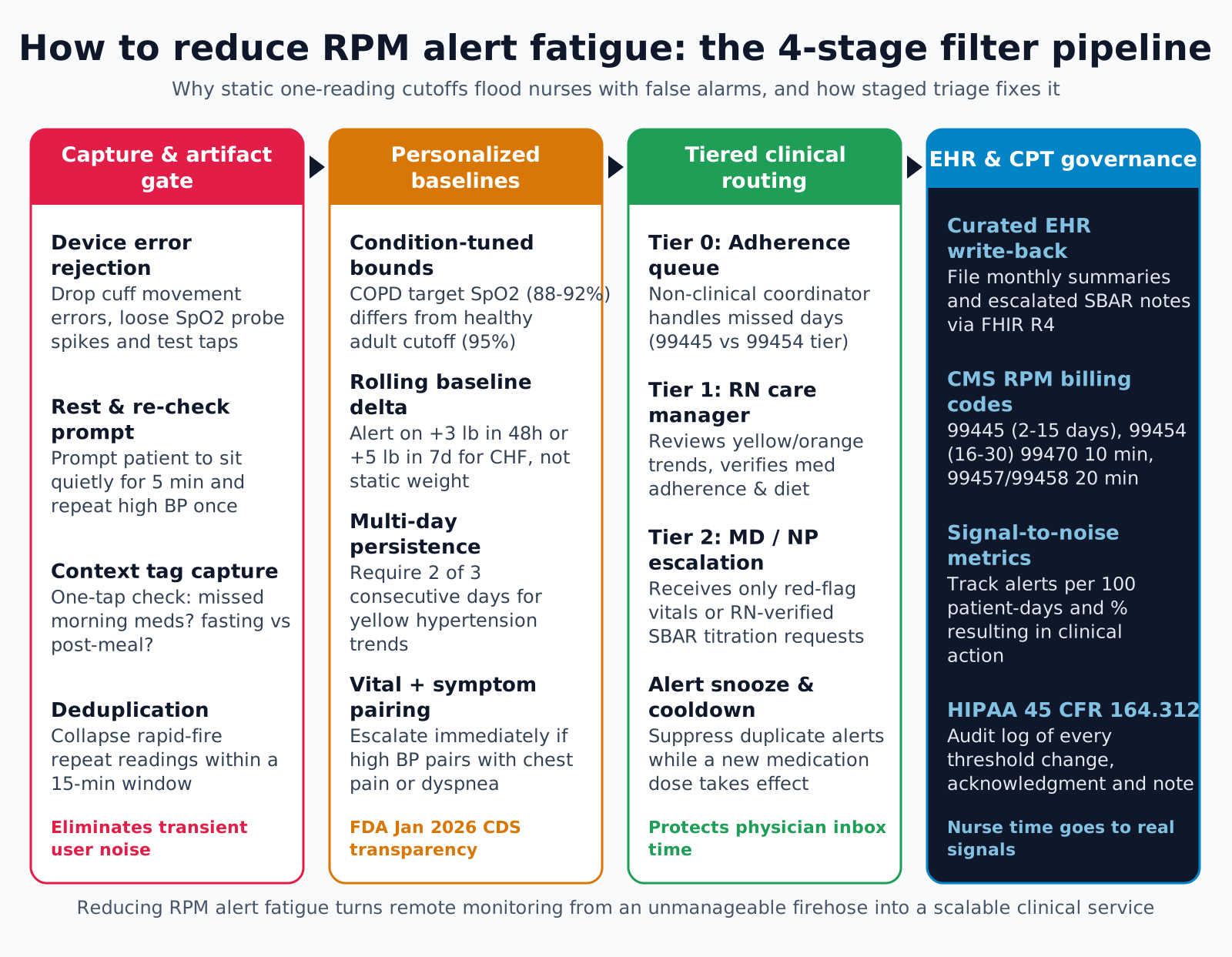
A staged pipeline removes noise at the cheapest point first. Each stage passes fewer, better alerts to the next, and each stage is configurable by the clinical team.
- Stage 1, capture gate: The patient app or cellular hub drops readings with device error flags, collapses repeats taken within a short configurable window, and asks the patient to rest and repeat a reading that crosses a threshold. It can also ask two short questions, such as whether the patient took their medication and has new symptoms.
- Stage 2, patient baselines: Rules compare readings to the patient's own recent history and to targets the clinician set in the care plan, and look for persistence over several days or a combination of a reading change with a reported symptom.
- Stage 3, tiered routing: Technical events such as missed uploads and pairing problems go to a non-clinical coordinator. Trends go to an RN care manager. Only urgent findings or nurse-verified escalations reach the physician or nurse practitioner. After a medication change, a clinician can set a cooldown that suppresses repeat low-level alerts for that measure while keeping critical limits active.
- Stage 4, curated EHR output: Raw readings stay in the RPM workbench. The EHR receives monthly summaries and nurse escalation notes, and the billing ledger records device days and management minutes for each code.
What a condition template should hold
Baseline rules work only when each condition has a template the clinical team owns. Clinicians set the values; the software stores and versions them.
- Measures: Which readings the template watches, such as blood pressure, weight, glucose or oxygen saturation.
- Baseline window: How many days of history form the patient's baseline, and how many readings are needed before baseline rules switch on.
- Persistence: How many days a change must last before a trend alert fires.
- Symptom pairing: Which patient-reported symptoms raise the tier of a reading change.
- Critical limits: Hard limits that always alert, ignore cooldowns and go straight to the urgent tier.
- Owner and version: The clinician who approved the template and the date, so any alert can be traced to the rules in force at the time.
What should an alert card show a nurse?
An alert card should let a nurse decide in one view whether to act. Every field below answers a question the nurse would otherwise look up.
- Why it fired: The rule in plain words, the readings that triggered it and the baseline window used.
- Trend: A short chart of the last two weeks for the measure, with medication changes marked.
- Context: Answers to the capture questions, active medications for the condition and the last nurse note.
- Data quality: Device type, whether the reading was a retake and any error flags.
- Actions: Call the patient, message, adjust a threshold with a reason, escalate, or close with a reason. Each action starts or stops the management timer.
- History: Previous alerts for this patient on this rule and how they were closed.
Why explainable rules help adoption
Clinicians tend to ignore a bare risk score they cannot check. A card that shows the readings and the rule lets the nurse agree or disagree quickly, and the disagreements become the data for tuning thresholds.
How do you know if alert load is improving?
Measure alert quality before changing anything, then track the same numbers after each change. These steps give a baseline and a feedback loop.
- 1. Count the load: Calculate alerts per 100 patient-days for the last 30 days, split by rule and by tier.
- 2. Measure action rate: For each rule, find the share of alerts that led to a documented action, such as a call, medication change or visit, versus closed with no action.
- 3. Move technical events: Route missed uploads, low battery and pairing alerts to the coordinator queue and remeasure the nurse queue.
- 4. Add capture checks: Turn on retake prompts and duplicate collapsing, and compare alert counts per rule before and after.
- 5. Switch to baselines: Replace single-reading cutoffs with persistence and baseline rules one condition at a time, with clinical sign-off for each template.
- 6. Review misses: Every month, check hospital visits and urgent calls among enrolled patients against the alert history to confirm the filters did not hide a real decline.
Alert design failure points
These are the common failure points in RPM alert design. Most of them make alert counts look better while making the program less safe or less billable.
- One threshold table for everyone: The same cutoffs for a young pregnant patient and an elderly heart failure patient guarantee false alarms in both.
- Raw alerts in the physician inbox: Sending every out-of-range reading into the EHR inbox teaches physicians to ignore the program.
- Filtering with no miss review: Suppression rules without a monthly check of missed events can hide real deterioration.
- Threshold changes with no record: When a clinician widens a range and nobody logs who, when and why, the audit trail and the care plan disagree.
- Fit and technique ignored: A cuff that does not fit the patient's arm produces systematic false readings that no rule can fix. Track cuff size at enrollment.
- Minutes counted by hand: Management time typed in at month end will not match the activity log. Start and stop the timer from the actions on the card.
How Agnotic can help
Alert noise is an engineering problem with clinical consequences, and Agnotic works on both sides of it. Agnotic Technologies builds RPM apps and nurse workbenches with capture checks, configurable baseline rules, tiered queues, explainable alert cards and curated EHR summaries, plus the day and minute ledgers that support CMS billing.
For an existing program, the work can start from your alert history: measuring load and action rates by rule, then changing one stage at a time with your clinical team.
Build a quieter RPM program with Agnotic
See Agnotic's custom RPM app development and remote monitoring solutions, or browse the Remote Care hub.
Related reading on Agnotic
Continue with RPM MVP delivery, wearables, maternal RPM, CCM billing, telehealth nursing and running an RPM program.
Sources
- CMS: CY 2026 Physician Fee Schedule final rule (CMS-1832-F) fact sheet
- CMS MLN901705: Telehealth and Remote Patient Monitoring
- FDA: Clinical Decision Support Software guidance (January 2026)
- 45 CFR 164.312: HIPAA Security Rule technical safeguards
- ASTP/ONC: Standardized API for patient and population services, 45 CFR 170.315(g)(10)


