



A video call lets a clinician see and hear a patient. It does not let them listen to a chest, look into an ear or check oxygen levels, which is why many virtual visits end with "come in so we can examine you".
Telemedicine hardware closes part of that gap. This post covers the equipment used for remote exams, from carts and exam cameras to digital stethoscopes and vital signs devices, and the software that connects each one to the remote clinician and the patient record. It is aimed at teams building or buying a telemedicine program for clinics, schools, nursing homes or hospital units.
What hardware and software are used for telemedicine?
Building telemedicine with remote exam devices?
Our telemedicine platform page covers the video, device capture and EHR connections we build for remote exam programs.
Telemedicine uses a computer, cart or tablet with a camera, microphone and speakers, plus exam peripherals such as a digital stethoscope, an exam camera with otoscope tips and vital signs devices. Agnotic Technologies builds the software that streams, captures and files each device's output against the right patient and visit.
The hardware gets the attention in demos. The software around it decides whether the exam data is usable afterwards.
Which setups need which hardware?
The setup depends on who is with the patient. A visit from a patient's home needs little more than a phone, while a nurse-assisted exam in a clinic or nursing home can use a full kit.
- Home visits: the patient's phone or laptop, sometimes with a cuff or scale connected by Bluetooth.
- Assisted exams: a cart or tablet kit with peripherals, operated by a nurse or medical assistant with the patient.
- Kiosks: a booth in a workplace, school or pharmacy with built-in devices and a guided flow.
- Mobile kits: a case of peripherals and a tablet carried by community health workers or paramedics.
What does a telemedicine cart include?
A telemedicine cart usually includes a medical-grade computer, a pan, tilt and zoom camera, a display, a speaker and microphone suited to noisy rooms, a battery, and drawers or holders for peripherals. Some add a second screen so the patient can see the remote clinician while the nurse sees the exam view.
Choose carts for the rooms they will work in. A cart that does not fit through a nursing home doorway or lasts only half a shift on battery will stand in a corner.
Cleaning matters as much as size. Carts move between patients and rooms, so surfaces, cables and peripherals need to survive the disinfectants your infection control team uses, and the kit needs a cleaning step the software can prompt for between visits.
Which peripherals matter for a remote exam?
The peripherals that matter are the ones that replace a hands-on step the remote clinician would otherwise skip. For most primary and urgent care, that means hearing, seeing and measuring.
- Digital stethoscope: streams heart, lung and bowel sounds to the clinician's headphones.
- Exam camera: interchangeable tips for ears, throat, skin and eyes, with stills captured on request.
- Vital signs: blood pressure cuff, pulse oximeter, thermometer and scale.
- Specialty devices: a 12-lead ECG, spirometer or ultrasound probe where the program needs them.
How does exam data travel from peripheral to the chart?
Exam data travels from the peripheral to the cart or tablet, where capture software tags it with the patient and visit, then splits into three paths: a live stream to the remote clinician, captured images and clips for storage, and vital signs filed in the EHR.
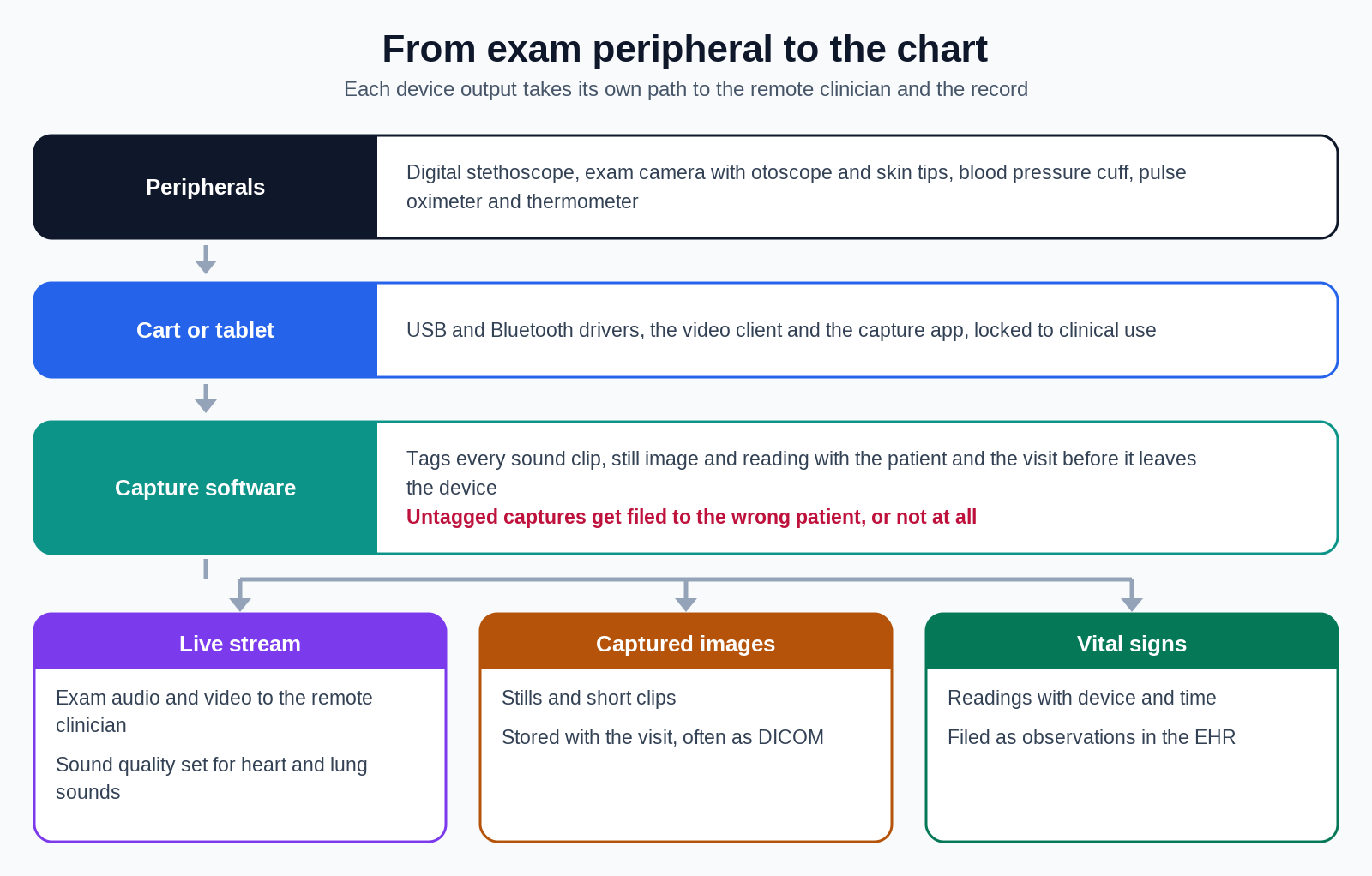
The tagging step is where most of the engineering goes. A still image of an eardrum with no patient attached is worse than no image, because someone may file it by guesswork.
How do Bluetooth vital signs devices connect?
Most Bluetooth vital signs devices connect to the cart or phone through standard health profiles, and the software reads each measurement with its time and units. Devices that use proprietary protocols need a vendor library or a separate app.
The Bluetooth SIG publishes adopted GATT service specifications for health devices, including the Blood Pressure, Glucose, Health Thermometer, Pulse Oximeter and Weight Scale services.
Prefer devices that implement the standard services, record the device identifier with each reading, and handle the reading that arrives late because pairing dropped mid-measurement.
Where do captured images belong?
Captured images belong with the visit, in a store the clinical team can reach later, not in the cart's local folder. Many programs store them as DICOM objects so they sit beside other imaging.
DICOM is the international standard for medical images and related information, maintained by NEMA and also published as ISO 12052.
In HL7 FHIR R4, the ImagingStudy resource represents the content of a DICOM imaging study and points to the endpoints where its images can be retrieved.
If a full imaging archive is not available, store images in your own system with the patient, visit, body site and device recorded, and link them to the visit note in the EHR.
What software runs on a telemedicine cart?
A cart runs more software than the video client. It needs device drivers, a capture app, device management for updates and remote lock, and a locked-down operating system so it is only used for clinical work.
- Kiosk mode: the cart boots into the telemedicine app and nothing else.
- Device management: updates, certificates and remote wipe pushed centrally, not by visiting each cart.
- Sign-in: short sessions for the nurse on site, with automatic sign-out between patients.
- Health checks: the cart reports battery, camera, microphone and peripheral status before each visit.
What goes wrong with telemedicine hardware?
Most problems are not hardware faults. They come from setup, support and the software that sits between the device and the record.
- Unpaired peripherals: a stethoscope that worked yesterday will not connect before the first visit of the day.
- Driver updates: an operating system update breaks the exam camera on every cart at once.
- Local storage: captured images saved on the cart and never uploaded.
- Poor audio: room noise and cheap microphones that make lung sounds useless.
- No owner: carts with flat batteries and missing tips because nobody checks them.
A worked example: a nursing home program
A group of nursing homes wants after-hours clinicians to assess residents without sending them to the emergency department. Each home gets one cart with a digital stethoscope, an exam camera and vital signs devices.
The night nurse starts a visit from the cart, which checks every peripheral and shows what is not ready. The remote clinician listens to lung sounds live, asks for stills of a wound, and sees the readings appear in the visit as they are taken.
Stills and readings are filed to the resident's record in the facility EHR, and the visit note links to them. A weekly report lists carts that failed health checks.
Who owns the equipment and software?
Equipment needs an owner at each site and a central owner for the fleet. Software needs an engineering owner who handles updates, drivers and the record connections.
- Site lead: daily checks, charging, cleaning and replacing tips.
- Fleet owner: device inventory, warranties and replacement stock.
- Engineering owner: capture app, drivers, device management and EHR filing.
- Clinical lead: which peripherals each visit type uses and how images are reviewed.
How do you test a telemedicine kit before go-live?
Test the full kit in the rooms where it will be used, with the staff who will use it, and follow each output to the record.
- Room test: audio quality for lung sounds with normal background noise.
- Pairing: power cycle every peripheral and confirm it reconnects without help.
- Filing: capture a still and a reading, then find both on the right patient in the EHR.
- Updates: apply a pending update on one cart first and repeat the checks.
- Battery: run a full shift of visits on battery and record when it runs out.
What are telemedicine hardware and software best practices?
Choose peripherals for the exams your clinicians actually need, prefer devices using standard health profiles, tag every capture with patient and visit before it leaves the device, and store images where clinicians can find them. Lock carts to clinical use and run health checks before each visit.
Pilot one site for a month before buying a fleet, and let the night staff, not the project team, decide whether the kit is easy enough.
How Agnotic can help
Agnotic builds the software around telemedicine hardware: capture apps that tag exam data, Bluetooth device integration, cart health checks, image storage and filing to the EHR, alongside the video visit itself.
Connect your exam devices with Agnotic
We integrate Bluetooth and USB peripherals with your telemedicine and EHR systems.
Related reading on Agnotic
Telemedicine platforms, store and forward, and imaging.


