



For many Indian hospitals, PM-JAY cases are a steady part of cashless work, and the cashless desk still spends hours keying the same case details into more than one screen. Sending PM-JAY cases through NHCX from the hospital's own HMIS promises one entry and a status everyone can see, but only if the HMIS produces bundles that meet PM-JAY's extra rules.
This post covers the hospital side of that work: what PM-JAY adds to the generic NHCX bundles, how package codes and pre-authorization fit the HMIS, how queries and claims flow, how to show status on the bill, and how to test against the sandbox before going live.
How do PM-JAY claims move through NHCX from a hospital HMIS?
Losing time to PM-JAY queries and rejected cases?
Our claims denial management page covers the AI agents we build to catch claim problems before submission.
PM-JAY claims move through NHCX as FHIR bundles that the hospital HMIS builds from the patient's case: a pre-authorization with package codes before treatment, answers to payer queries, a claim with discharge documents after treatment, then a payment notice. Agnotic Technologies builds this HMIS side so the cashless desk enters each case once.
The National Health Authority describes PM-JAY as cashless cover of up to Rs 5 lakh per family per year for secondary and tertiary care hospitalization, on a family floater basis, usable at empanelled public and private hospitals across the country.
What does PM-JAY add to generic NHCX bundles?
PM-JAY adds its own requirements to the generic NHCX bundles, so an HMIS that already sends cases to private insurers through NHCX still needs PM-JAY-specific work.
ABDM's NHCX FHIR reference says everything that crosses the exchange is one FHIR R4 Bundle of type collection built to the NRCeS profiles, that these bundles are generic so any payer on the exchange takes them, and that PM-JAY adds its own changes and requirements on top.
For PM-JAY on NHCX, ABDM's reference requires a Health Professional Registry identifier for the practitioner, claim items coded from the package master with the ward tier as a modifier, supporting information numbered from 1 without gaps, and attachments only as PDF, JPG, JPEG, PNG or FHIR JSON.
Build these rules into the HMIS as validation that runs before a bundle is sent, so the cashless desk sees a missing identifier while the patient is still in the hospital, not when a rejection arrives.
How does a PM-JAY case flow between HMIS, NHCX and the payer?
A case flows in paired steps: the HMIS sends a pre-authorization and receives a decision, answers any queries, sends the claim after discharge and receives a claim response, and finally receives a payment notice to post against the bill.
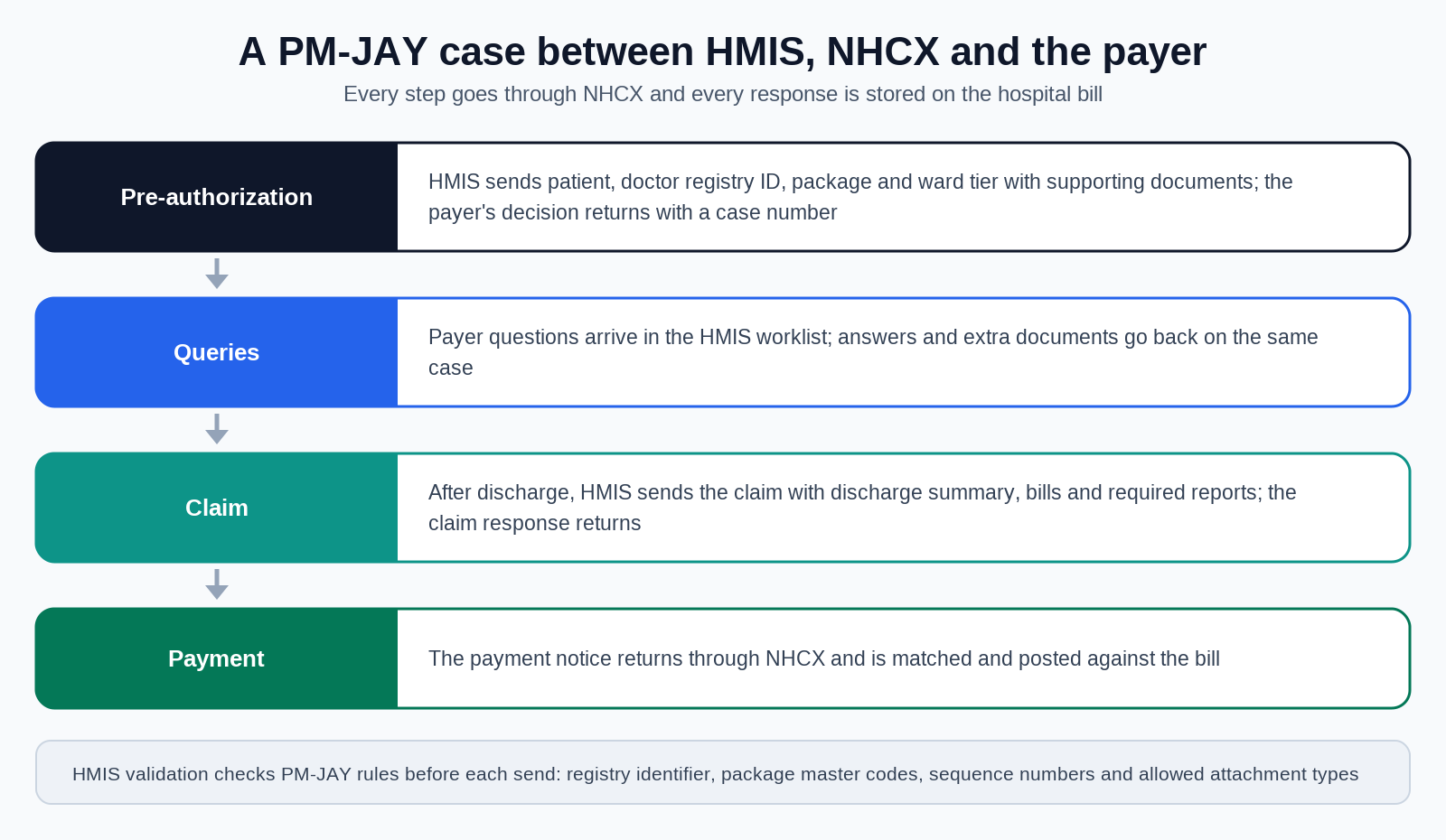
Each step returns through NHCX, and each response must be matched to the right case and stored on the bill. A response that sits only in an exchange console does not help the desk.
Which master data must be ready first?
Master data must be ready before the first bundle is built, because most refusals trace back to it. Check it department by department.
- Doctors: each treating doctor with a registry identifier and registration number in the HMIS.
- Facility: the hospital's identifiers as registered for the exchange.
- Packages: the hospital's PM-JAY services mapped to the package master.
- Documents: templates for discharge summaries and reports, exported in allowed formats.
How should package codes be handled in the HMIS?
Package codes should come from the PM-JAY package master loaded into the HMIS, never typed by hand. Map each procedure or treatment the hospital offers under PM-JAY to its package, specialty code and ward tier stratification.
- Master load: the package master version loaded, with its date, and updates applied when the master changes.
- Selection: the desk picks a package from a list filtered by the treating specialty.
- Ward tier: the ward or bed category mapped to the stratification code.
- Checks: packages that need specific documents flagged at selection.
Pre-authorization from the HMIS
Build the pre-authorization from data the HMIS already holds: the patient, the admitting doctor with registry identifier, the package, the ward tier and the clinical notes or reports that support the request. Attach documents in the allowed formats only.
Show the desk a checklist per package before sending, and record the request time and case number returned. The case number becomes the key for every later message on that admission.
How should queries be answered?
Queries should land in a worklist in the HMIS, linked to the case, with the question, the deadline if one is given and the documents requested. The person who answers should be able to attach documents and reply without leaving the HMIS.
Track how many cases receive queries and why. Repeated queries for the same package usually point to a document the hospital could attach at pre-authorization.
Claim submission after discharge
Submit the claim from the discharge record: final package, procedure details, discharge summary, bills and any reports the package requires, each attached in an allowed format and numbered in sequence.
Compare the claim with the approved pre-authorization before sending. A package or ward tier that changed during the stay needs to be explained in the claim, not discovered by the payer.
Showing status on the hospital bill
Store every NHCX response on the patient's bill in the HMIS: pre-authorization decision, queries, claim response and payment notice, each with its time. The cashless desk, billing and finance should all see the same status.
When the payment notice arrives, match the amount to the bill and post it. Any difference between claimed and paid amounts should open a follow-up item, not disappear into a write-off.
How do you test before going live?
Test in the ABDM sandbox against the PM-JAY payer with real case types from your hospital, de-identified, before sending live cases.
- Packages: one case for each common package and ward tier.
- Rules: cases missing a registry identifier, with gaps in sequence and with a disallowed attachment type.
- Queries: a pre-authorization that receives a query and is answered from the worklist.
- Changes: a stay where the package changed between pre-authorization and claim.
- Payment: a payment notice matched and posted to the bill.
What goes wrong with PM-JAY on NHCX?
Most problems come from building generic NHCX bundles and discovering PM-JAY's rules in production. These patterns recur.
- Missing practitioner identifiers: doctors without registry IDs in the HMIS.
- Hand-typed packages: codes and tiers entered from memory.
- Sequence gaps: supporting information numbered unevenly after edits.
- Wrong file types: scanned documents in formats the payer refuses.
- Status outside the HMIS: responses visible only in a separate console.
A worked example: a multi-specialty hospital's first PM-JAY cases
A multi-specialty hospital connected its HMIS to NHCX for private insurers first, then added PM-JAY. Early sandbox cases were refused because several doctors lacked registry identifiers in the HMIS and attachments were in an unsupported format.
The team added doctor registry IDs to the HMIS master, loaded the package master with ward tier mappings, and converted attachments automatically. A pre-send checklist caught the remaining gaps.
The hospital started with planned surgery cases, then extended to other departments once the desk trusted the status on the bill.
Who owns what?
PM-JAY on NHCX touches clinical, desk, billing and IT teams.
- Cashless desk: case entry, pre-authorization and query replies.
- Medical records: discharge summaries and supporting documents.
- Billing and finance: claims, payment posting and differences.
- HMIS and IT: package master, validation, NHCX connection and monitoring.
- Medical administration: doctor registry identifiers and package policy.
How do you measure the integration?
Measure how cleanly cases move and how quickly money arrives.
- Bundles refused before reaching the payer, by reason.
- Cases receiving queries, by package.
- Time from discharge to claim sent, and from claim to payment notice.
- Differences between claimed and paid amounts, by package.
What are PM-JAY on NHCX best practices?
Build PM-JAY's extra rules into HMIS validation, load the package master rather than typing codes, keep doctor registry identifiers current, and attach documents only in allowed formats with clean sequence numbers.
Store every response on the bill, answer queries from a worklist, test each package type in the sandbox, start with one department and measure refusals, queries and payment differences every month.
How Agnotic can help
Agnotic builds the hospital side of NHCX and PM-JAY: HMIS bundle builders, package master loading, pre-send validation, query worklists, status on the bill, payment posting and sandbox testing with real case types.
Connect your HMIS to NHCX with Agnotic
Our NHCX integration page covers the hospital and payer connections we build on India's claims exchange.
Related reading on Agnotic
NHCX, ABDM and hospital systems in India.


