


RPM alerts in Epic are where a home blood pressure cuff or scale meets a clinician's working day. A reading that never reaches the chart cannot trigger anything, and a reading that triggers the wrong message, to the wrong person, adds noise without adding care.
This guide follows a reading from the device to a clinician's action using the RPM approach Epic documents publicly. It covers what enrollment sets up, the two ways to file readings, whose thresholds should decide an alert, how the response gets recorded, and how to stop cleanly when monitoring ends.
How do RPM alerts reach clinicians in Epic?
Building an RPM program that files into Epic?
Agnotic builds custom RPM apps for the client, including enrollment intake, flowsheet filing over HL7 v2 or FHIR, and alert triage.
RPM alerts reach clinicians in Epic when the monitoring platform files each reading to the patient's patient-entered flowsheet, by HL7 v2 or the FHIR Observation create API, and Epic compares it with the normal ranges the provider set on the enrollment order. An abnormal value can then send an In Basket message to the provider for review.
In Epic, discrete data such as vital signs lives in flowsheets. Epic's RPM playbook uses patient-entered flowsheets for RPM, marking the readings as sourced from the patient, either from their own device or typed in by them. Filing to the chart is what gives clinicians the home readings in context and lets Epic's own escalation and billing tools work from them.
What does enrollment set up in Epic?
Enrollment opens the flowsheet for one patient and one period, and tells the RPM platform the patient has joined. Patient-entered flowsheets are not open to filing by default, so nothing files until a provider enrolls the patient.
In the workflow Epic describes, a provider places an order for the RPM program. The order can carry questions specific to the program: high and low normal ranges for individual vitals, how often in days the provider wants to be notified of the patient's entries, and the supporting diagnoses.
The order creates an episode tied to the flowsheet, and some customers also create a second episode that shows the patient is under active monitoring. Epic can then send an HL7 v2 Outgoing Ancillary Orders message to the RPM platform with the patient's identifiers, the signing provider and the order identifier.
The notification interval matters as much as the ranges. A provider who asks to hear about entries every seven days expects a summary rhythm, not a message for every reading, so the platform's own outreach should follow the same rhythm unless a reading needs faster attention.
Treat that message as the start of the patient's record in the platform. Match it to the device shipment, store the order identifier for every later step, and alert the program team if a device ships without a matching enrollment.
How does a reading travel from device to In Basket?
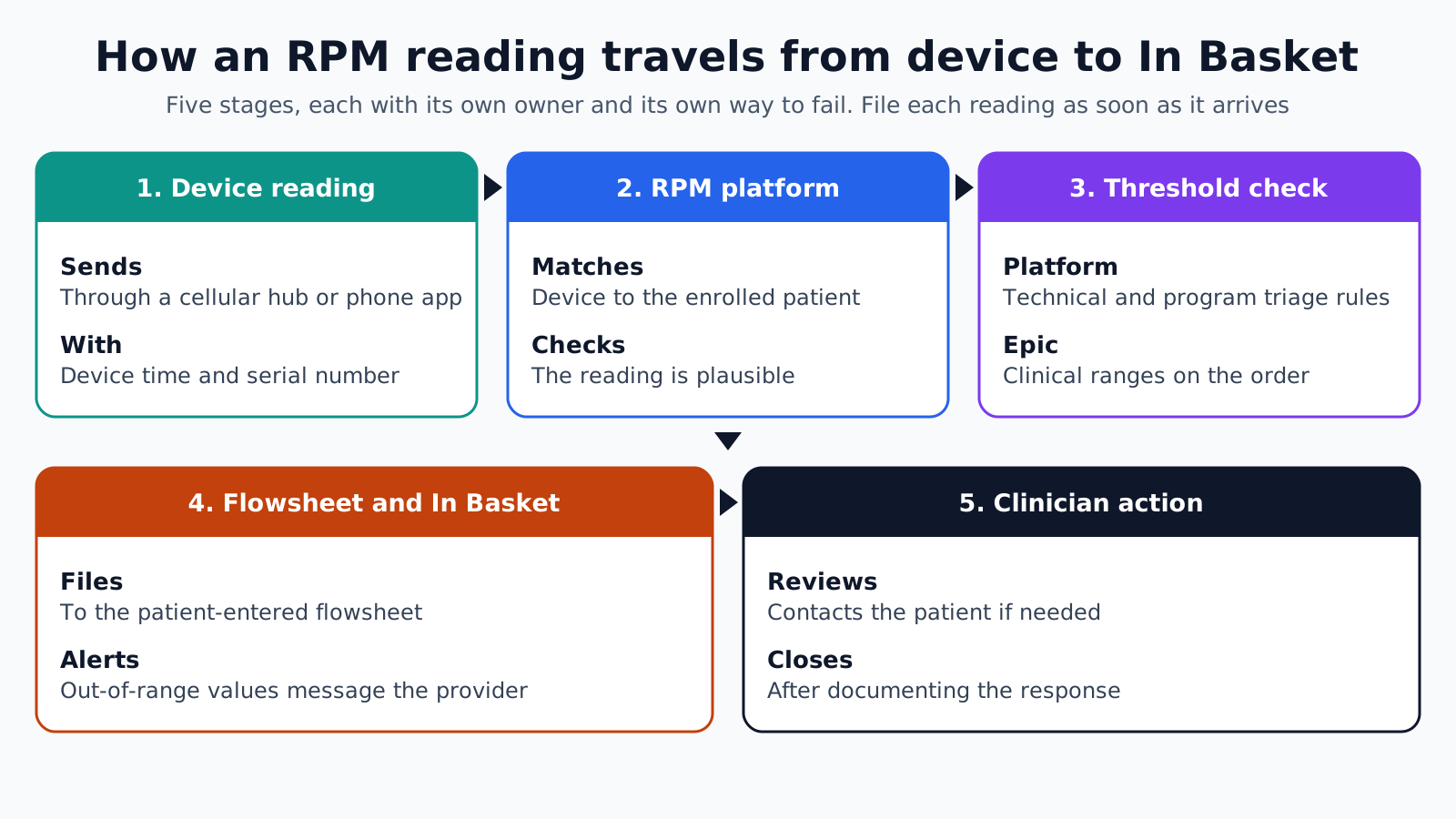
A reading passes through five stages: the device reading, the RPM platform, a threshold check, the Epic flowsheet and In Basket, and the clinician's action. Each stage has its own owner and its own way to fail.
- 1. Device reading: The cuff, scale or meter takes a measurement and sends it, usually through a cellular hub or a phone app, with the device time and serial number.
- 2. RPM platform: The platform matches the device to the enrolled patient, checks the reading is plausible, and stores it with its source.
- 3. Threshold check: The platform runs its own triage rules for technical and program issues, while the clinical ranges set on the Epic order are applied inside Epic after filing.
- 4. Epic flowsheet and In Basket: The reading files to the patient-entered flowsheet, and a value outside the order's ranges can send an In Basket message to the provider.
- 5. Clinician action: A nurse or provider reviews the message, contacts the patient if needed, documents the response in Epic and closes the message.
File each reading as soon as it arrives. Epic's playbook advises real-time filing because filed readings can trigger messages to providers, and a batch sent at the end of the day delays the alert by hours.
HL7 v2 or FHIR Observation for filing?
Epic documents two filing paths, and the choice depends on whether patients sign in to the platform. Devices that send readings without a patient login fit HL7 v2; apps where patients enter or edit readings fit FHIR.
- HL7 v2 flowsheet interface: Epic recommends its Incoming Clinical Documentation Flowsheet Data, Patient Entered interface when there is no patient-facing entry screen or several vitals file at once. It files straight from the device, needs no active MyChart account, and the readings are read-only for patients in MyChart, though they can delete them.
- FHIR Observation create: Epic recommends this for apps where patients sign in and file readings with their own credentials. Patients need active MyChart accounts, each reading is its own call, and patients can modify those readings in MyChart.
Both paths need flowsheet row mapping. The customer maps its rows so the interface knows which row holds systolic pressure, weight or heart rate, and some rows carry LOINC codes by default. Collect the mapping per customer and test every vital type before go-live.
Patient identity comes first on either path. The HL7 interface needs the patient's name and an identifier, which the platform can take from the enrollment message or look up with the FHIR Patient search API. The identifier system for the medical record number differs at each customer, so store it as configuration rather than hard-coding a value from the sandbox.
Send a flag for manually entered readings where the customer supports it. A typed value and a device value should not look the same to the clinician deciding whether to act.
Whose thresholds should decide an alert?
Clinical alerts should come from one place, and in an Epic-integrated program that place is the ranges the provider sets on the order inside Epic. The platform's own rules should handle what Epic cannot see.
Epic's playbook is direct on this point: the platform should not use the abnormal ranges sent on the HL7 enrollment message, because providers can change those values later and there is no way to notify the platform of the change. A platform that alerts on its own copy of the ranges will drift from the chart.
- Epic decides: Readings outside the provider's normal ranges, routed to In Basket under the customer's configuration.
- Platform decides: Missed readings, devices that stopped sending, low battery, readings with impossible values, and devices that need replacing.
- Shared view: The platform's dashboard can show Epic-generated alerts for context, but should not raise a second clinical alert for the same reading.
Two alert sources for one high reading is the fastest way to teach clinicians to ignore both. Decide in writing which system raises which alert before the first patient enrolls.
Who acts on an alert, and how is it recorded?
A named role acts on each alert, and the action is recorded in Epic where the rest of the care team can see it. The platform's own log is a supporting record, not the chart.
One workable design routes messages to a pool of RPM nurses rather than to the ordering provider alone, with escalation to the provider for readings that need a medication change. The customer's In Basket configuration controls this routing, so agree on pools and escalation rules with the customer's Epic team during build.
Recording covers three things: what the clinician saw, what they did, and when. A call to the patient, advice given and any follow-up appointment belong in the chart. Epic's playbook also notes that Epic provides tools to calculate RPM billing from device data and clinical time, so the platform does not need to send charges itself when the customer uses them.
Ending monitoring cleanly
Monitoring ends when the provider ends the episode in Epic, and the platform must stop filing at that point. Readings filed after the end have nowhere sensible to go and can confuse the chart.
Epic's playbook describes checking the FHIR EpisodeOfCare resource for each enrolled patient, for example once a day, and stopping when its status moves from active to finished. Where the customer also uses an active-monitoring episode, the platform checks both and stops if either has ended. Programs are told apart by an episode name extension that the customer agrees with the vendor.
Close the loop on the device too. When the episode ends, the platform flags the device for return or deactivation, so readings from a device still in a drawer do not appear on a dashboard months later.
Where RPM-to-Epic builds fail
- Filing before enrollment: Readings arrive before the order opens the flowsheet, and the interface rejects them.
- Copied ranges: The platform alerts on ranges from the enrollment message, which no longer match the chart.
- Duplicate alerts: Epic and the platform both raise an alert for the same reading.
- Wrong row mapping: Weight files to the wrong flowsheet row at one customer because mapping was assumed, not collected.
- Batch filing: Readings are sent once a day, so In Basket messages arrive hours after the measurement.
- Ignored episode end: The platform keeps filing after the provider ends monitoring.
How Agnotic can help
An RPM program that files into Epic succeeds or fails on details: enrollment matching, row mapping, real-time filing and a clear split of alerts. Agnotic Technologies builds this for the client: enrollment intake from Epic's order messages, filing over the HL7 v2 flowsheet interface or FHIR Observation create, technical triage for device and data issues, and daily episode checks that stop filing on time.
Agnotic works with the customer's Epic analysts on flowsheet rows, In Basket pools and escalation rules, and tests every vital type and alert path before the first patient enrolls.
Build an RPM app that files into Epic
Start with custom RPM app development, or browse more articles in the EHR integration hub.
Related reading on Agnotic
Continue with Epic In Basket, RPM alert fatigue, HL7 orders and results, personal RPM baselines and RPM basics.


