



Medical images arrive in bursts: a scanner finishes a study, a night of outside studies lands at once, an archive migration sends years of images. Processing them on servers sized for the peak wastes money most of the day, and servers sized for the average fall behind when the burst comes.
Serverless designs answer that with storage events, queues and short-lived functions that scale with the work. This post explains how to build such a pipeline for DICOM images: which jobs suit it, how studies flow through it, the limits that shape it, de-identification, returning results, failure points, an example and testing.
What is a serverless architecture for medical image processing?
Planning an imaging pipeline in the cloud?
Our serverless development service builds event-driven systems that scale with the work they receive.
A serverless architecture for medical image processing receives DICOM files into cloud storage, and each arrival triggers queued, short-lived functions that validate, index, de-identify, convert or route the images, with longer jobs handed to containers. Capacity follows the volume of studies. Agnotic Technologies builds these pipelines for imaging and AI teams.
DICOM is the international standard for medical images and related information, maintained by NEMA and also published as ISO 12052.
Which imaging jobs suit serverless functions?
Functions suit short, independent steps on single images or headers. Long or heavy work, such as processing a full volume on a GPU, belongs in containers that the pipeline starts and watches.
- Good fit: reading and validating headers, indexing, routing rules and thumbnails.
- Good fit: header de-identification and format conversion for single instances.
- Better in containers: full-study AI inference and three-dimensional reconstruction.
- Better in containers: anything that needs a GPU or holds a whole large study in memory.
How does a study move through a serverless pipeline?
An on-site gateway receives studies from scanners or the PACS and uploads each instance to a landing bucket. Every upload raises an event, a queue absorbs bursts, and functions process instances while a workflow service tracks each study as a whole.
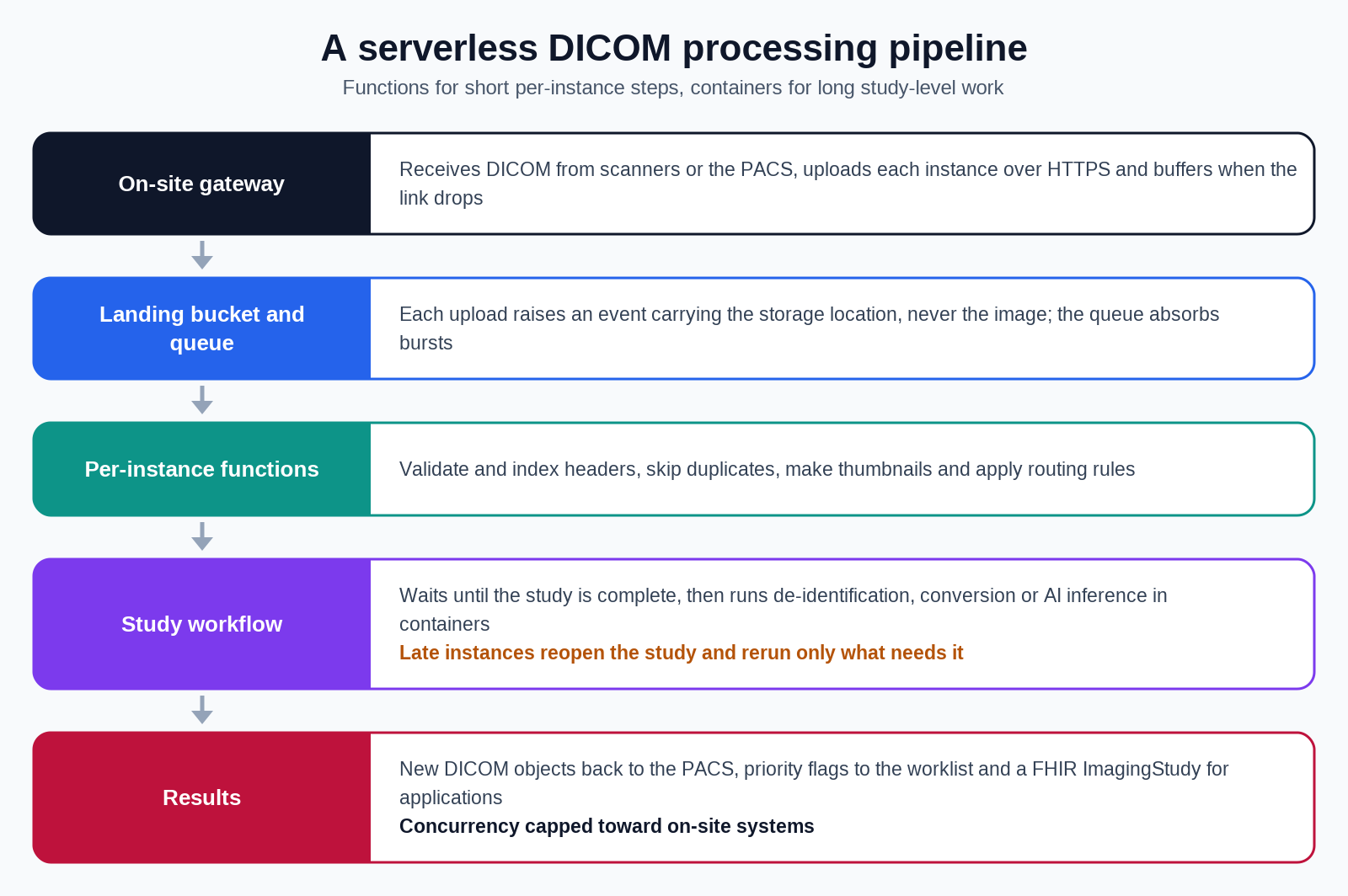
Keep the gateway simple and on site: it speaks DICOM to local systems and HTTPS to the cloud, and it buffers when the connection drops.
How do you know a study is complete?
DICOM studies arrive as many separate instances, often across several series, with no message that says the study is finished. A pipeline that starts study-level work on the first file will process half a study.
- Stability window: treat a study as complete after no new instances arrive for a set period.
- Expected counts: use counts from the modality or worklist where they exist.
- Late arrivals: reopen a study and rerun only the steps that need it.
- Duplicates: ignore an instance whose unique identifier was already processed.
What limits shape the design?
Function limits decide what runs where and what travels in each event. Design around them from the start instead of discovering them on the largest study.
AWS Lambda documentation sets a function timeout of up to 1,800 seconds (30 minutes), memory of 128 MB to 10,240 MB, /tmp storage of 512 MB to 10,240 MB, and a payload limit of 1 MB for asynchronous invocations.
Events should carry the storage location of an image, never the image itself. Functions stream large files rather than loading them whole, and any step that could run past the timeout moves to a container task.
How should de-identification work?
De-identify in two places: the header and the pixels. Header tags with names, dates and identifiers are removed or replaced by rule, but some images have patient details burned into the pixels, and private tags can hide identifiers too.
Keep the link between original and de-identified identifiers in a separate, tightly controlled store, and log every run with the rule set version used. Spot-check output images by eye, especially ultrasound and scanned documents.
How do results get back to clinicians?
Return results where clinicians already work. Processed images or AI findings can go back to the PACS as new DICOM objects, and a FHIR record can point applications to the study.
In HL7 FHIR R4, the ImagingStudy resource represents the content of a DICOM imaging study and points to the endpoints where its images can be retrieved.
If a result should change reading priority, send it to the worklist system too. A finding that sits only in a cloud bucket helps nobody.
Security and privacy in an imaging pipeline
Images and headers are protected health information, so the pipeline needs the same controls as any clinical system. Serverless adds one advantage: each function can have its own narrow permissions.
- Permissions: each function reads and writes only its own buckets and queues.
- Encryption: images encrypted in storage and on every link, including from the gateway.
- Network: functions and containers run in private networks where they reach clinical systems.
- Logs: identifiers and file locations only, never header contents or pixel data.
How does a serverless pipeline behave under load?
It scales out quickly, which is the point, but downstream systems may not. Many functions sending results to one on-site PACS at the same moment can overwhelm it.
Cap concurrency for steps that call local systems, let the queue hold the backlog, and watch queue age as the main health signal. Cost follows usage, so a surge in studies shows up in the bill as well as the queue.
How should failed images be handled?
Some instances will fail: a corrupt file, an unexpected transfer syntax, a header that breaks a rule. Each failure must be visible, retried where a retry could help and kept for review where it cannot.
- Retries: automatic for temporary errors such as a timeout on a downstream call.
- Dead-letter queue: failed instances parked with the error and the step that failed.
- Alerts: imaging IT told when failures rise or a study stays incomplete.
- Replay: fixed instances sent through the pipeline again without duplicating results.
Make every step safe to run twice. Retries and replays are only harmless when processing the same instance again gives the same result.
Where do serverless imaging pipelines fail?
Most failures come from treating images like small web events.
- Partial studies: study-level work started before all instances arrived.
- Images in events: payloads that break limits on the first large file.
- Timeouts: long jobs left in functions until a big study fails.
- Burned-in identifiers: header de-identification only, with names still in the pixels.
- Flooded PACS: unlimited concurrency sending results back to one local system.
A worked example: routing CT studies to an AI service
An outpatient imaging group wanted every CT study sent to a cloud AI service and the findings returned to radiologists. The first design called the AI service from a function as each instance arrived.
Studies were processed half complete and some calls timed out. The team added a stability window per study, moved inference to container tasks started by the workflow service, and passed storage locations instead of images.
Findings returned to the PACS as new DICOM objects and to the worklist as a priority flag. A concurrency cap on the return step stopped the local PACS from being flooded after busy evenings.
Who owns what?
Imaging pipelines cross radiology, imaging IT and cloud engineering.
- Radiology lead: which results matter and how they appear to readers.
- Imaging IT: gateway, PACS connections and DICOM routing rules.
- Cloud engineering: storage, queues, functions, containers and monitoring.
- Privacy: de-identification rules, identifier mapping and access.
How do you test a serverless imaging pipeline?
Test with real-shaped DICOM data, not tidy samples. Use de-identified or synthetic studies that include the awkward cases your sites produce.
- Volume: a burst of studies larger than any normal day.
- Shape: multi-series studies, very large instances and late arrivals.
- Errors: duplicates, corrupt files and a gateway that loses its connection.
- Privacy: images with burned-in text and private tags carrying identifiers.
What are serverless medical image processing best practices?
Use functions for short per-instance steps and containers for long or heavy work, pass storage locations in events, and decide study completeness explicitly before any study-level job runs.
De-identify headers and pixels, return results to the PACS and worklist, cap concurrency toward local systems, give each function narrow permissions and test with bursts and awkward studies.
How Agnotic can help
Agnotic builds serverless imaging pipelines: on-site gateways, event and queue design, study completeness tracking, de-identification of headers and pixels, container steps for AI, and results returned to PACS, worklists and FHIR applications.
Connect your pipeline to PACS with Agnotic
Our DICOM and PACS integration page covers how we connect imaging systems, archives and applications.
Related reading on Agnotic
Imaging, DICOM and cloud architecture.


