



Many clinical trials struggle to find enough eligible patients, even when those patients are sitting in the health records of nearby practices. The gap is rarely a lack of data. It is the work between a database query and a patient sitting in a screening visit: checking charts, reaching people in the right way, and handing them to a site that is ready.
This post covers the software for that work: running cohort queries on EHR data, pre-screening charts, outreach that respects patients' choices, referral to study sites, and feeding outcomes back so the next query is better. It is for health systems, research networks and sponsors building recruitment tools.
What is clinical trial patient recruitment software?
Building recruitment tools for clinical research?
Our clinical trial management page covers the recruitment, site and study systems we build.
Clinical trial patient recruitment software finds possible participants in EHR data, supports coordinators in pre-screening their charts, manages outreach under approved rules and refers interested patients to study sites, recording each step. Agnotic Technologies builds it so every exclusion and contact decision can be explained later.
A query can list thousands of possible patients in seconds. The software's real job is helping people turn that list into appropriate conversations.
How does a patient move from EHR query to site referral?
A patient moves through four steps: a cohort query lists them as a possible candidate, a coordinator pre-screens their chart, an approved contact path invites them, and if interested they are referred to the study site for screening and consent.
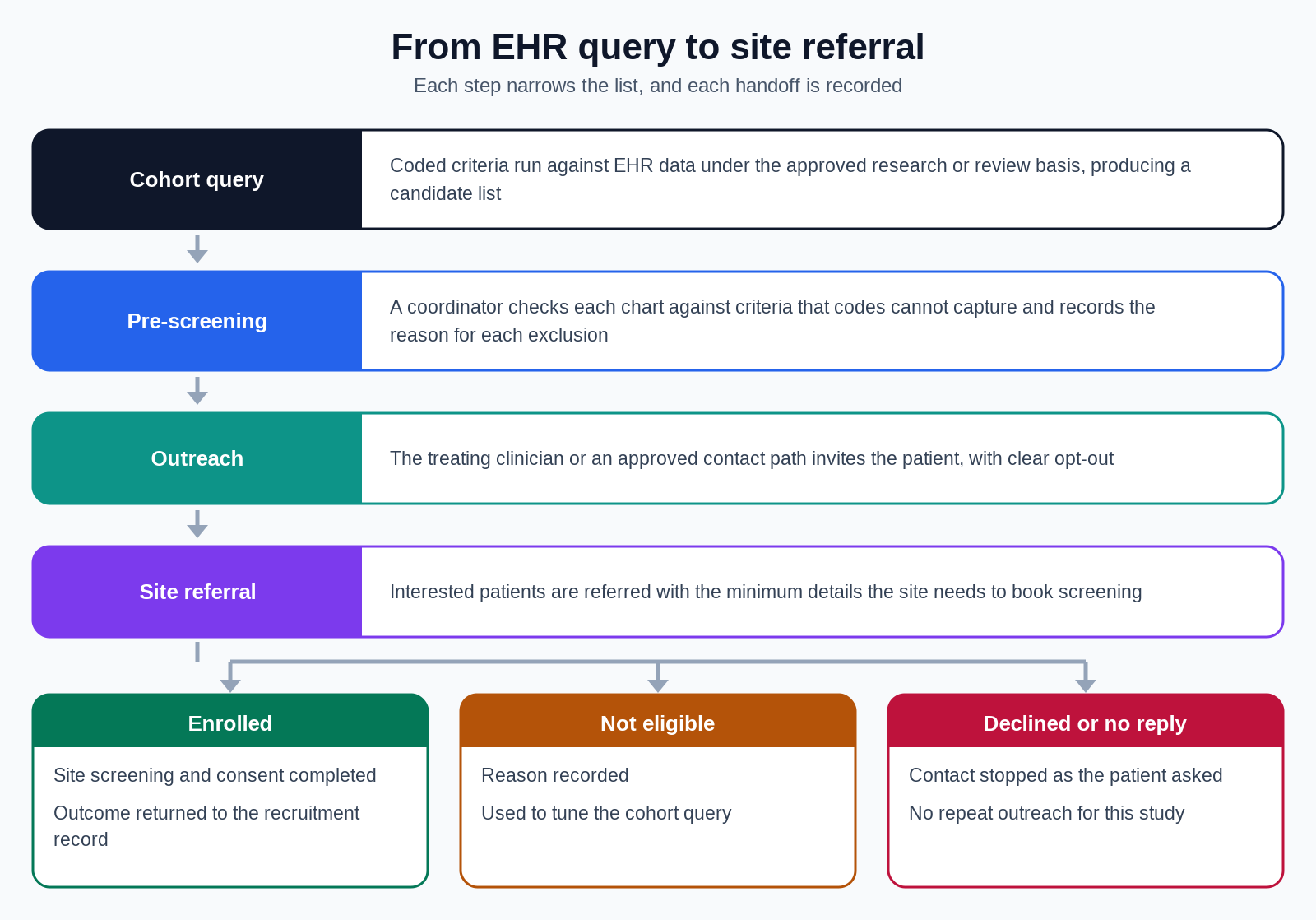
The outcome of each referral should come back to the recruitment record. Without it, nobody learns which criteria or contact methods work.
How should cohort queries be built?
Build cohort queries from the protocol's inclusion and exclusion criteria, translated into codes, values and time windows, and reviewed by someone who knows both the protocol and the local data. Many criteria cannot be expressed in codes, so the query should aim to find likely candidates, not decide eligibility.
- Translation: each criterion mapped to diagnosis codes, lab values, medicines or age, with its source.
- Gaps: criteria the data cannot capture marked for chart review.
- Versions: each query versioned, so results can be compared after changes.
- Counts first: aggregate counts to test feasibility before any patient list is produced.
What permissions does recruitment need?
Recruitment needs a clear basis for looking at patient records and for contacting patients, approved by the institution's review board or privacy office. The software should enforce that basis rather than leave it to each user.
The HIPAA Privacy Rule lets covered entities use or disclose health information for research with a waiver of authorization approved by an IRB or privacy board.
Record the approval for each study, limit who can see identified candidate lists, and log every view of a candidate's record.
How should pre-screening work?
Pre-screening should give coordinators a worklist of candidates with the relevant parts of each chart, a checklist of criteria and a required reason for every exclusion. Free-text notes alone make it impossible to learn from exclusions.
Show the evidence behind each query match, such as the lab value and date, so coordinators can confirm quickly. Remove candidates already contacted for this study or who have asked not to be contacted for research.
How should patients be contacted?
Patients should be contacted through a path the review board approved, often through their own clinician first, with a plain explanation, a way to say no and no repeat contact after a refusal.
- Clinician first: the treating clinician agrees before outreach, where the approval requires it.
- Channels: letters, portal messages, texts or calls, as approved for the study.
- Opt-out: one step, honored across studies where the patient asks.
- Records: every contact, response and refusal logged against the study.
How should referrals reach study sites?
Referrals should reach sites with only the details needed to book screening, through a secure channel, and the site should confirm receipt and report the outcome. A referral sent by email and never acknowledged is a lost patient.
Give sites a simple referral inbox with status updates, or connect to their study systems where they have them. Set a target for how quickly sites respond to a referral, and show the patient a realistic message about when to expect a call.
Reaching patients who are often left out
Recruitment that relies only on coded data and portal messages tends to reach the same groups of patients again and again. People with gaps in their records, limited internet access or another preferred language are missed before anyone decides whether they would like to take part.
- Channels: letters and phone calls alongside portal messages, where the approval allows.
- Language: materials and calls in the languages the clinic's patients speak.
- Data gaps: review candidates whose records are thin rather than excluding them by default.
- Reporting: recruitment funnel results broken down by group, so gaps are visible.
How do you test recruitment software?
Test it with synthetic patients built to sit just inside and just outside each criterion, and with a mock study run end to end before real candidates are listed.
- Criteria: confirm each coded criterion includes and excludes the right synthetic patients.
- Permissions: confirm users without study approval cannot see identified lists.
- Opt-out: record a refusal and confirm the patient never reappears for that study.
- Referral: send a test referral and confirm the site's acknowledgment returns.
Registration and public listings
Patients and clinicians often find trials through public registries, and recruitment tools can link to them. The registry entry should match what the recruitment materials say.
FDAAA 801 and its final rule require registration and results reporting for applicable clinical trials on ClinicalTrials.gov.
Use the registry identifier in recruitment records, so a patient's referral can be tied to the right listing and protocol version.
Feasibility before recruitment
Before a study opens, sponsors and sites want to know whether enough patients exist. Recruitment software can answer that with aggregate counts, without exposing any individual record.
Run the coded criteria as counts by site and month, show which criteria remove the most candidates, and share the result with the investigator. A criterion that removes most of the population is worth discussing before the protocol is final, not after recruitment stalls.
What goes wrong with recruitment software?
Recruitment tools fall short on follow-through more often than on querying. These patterns recur.
- Query as eligibility: candidates treated as eligible because codes matched.
- Unrecorded exclusions: no reasons, so criteria are never improved.
- Repeated contact: the same patient approached for several studies in a short period.
- Lost referrals: sites never confirm receipt or report outcomes.
- Over-sharing: identified lists visible to more staff than the approval allows.
A worked example: a research network recruits for a diabetes study
A research network runs a cohort query for adults with type 2 diabetes and a recent lab value in range, excluding certain medicines. Aggregate counts confirm feasibility before any names are released.
Coordinators pre-screen charts and record reasons for exclusion; a common reason is a criterion the codes miss, so the query is refined. Treating clinicians approve outreach by portal message, and patients who reply are referred to the site's inbox.
The site reports screening outcomes, and the network compares contact methods and exclusion reasons each month.
Who owns what in recruitment?
The study team owns the protocol and criteria, the institution owns approvals and contact rules, and the recruitment team owns the day-to-day work.
- Principal investigator: criteria interpretation and outreach materials.
- Review board or privacy office: approvals and contact rules.
- Coordinators: pre-screening, outreach and referrals.
- Data team: queries, versions and feasibility counts.
How do you measure recruitment?
Measure each step of the funnel, by study and contact method, and look at where candidates drop out.
- Candidates found and pre-screened, with exclusion reasons.
- Contacts made and responses received, by channel.
- Referrals sent, acknowledged and screened by sites.
- Enrollment and time from first contact to screening visit.
What are clinical trial patient recruitment best practices?
Use queries to find candidates, not to decide eligibility, test feasibility with counts first, require exclusion reasons, contact patients through approved paths with easy opt-out, confirm every referral and feed outcomes back into the query.
Keep identified lists narrow and logged, and share recruitment results with sites and investigators every month. When a study closes, close its lists too, and remove access to candidate data that is no longer needed.
How Agnotic can help
Agnotic builds recruitment software for health systems, research networks and sponsors: cohort query tools on EHR data, pre-screening worklists, outreach with consent tracking, site referral inboxes and recruitment dashboards.
Plan your recruitment platform with Agnotic
Our fractional CTO service helps research teams plan data access, tools and integrations.
Related reading on Agnotic
Trial systems, analytics and data management.


