



A connected patient does not live in one app. A reading happens at home, a message arrives at lunch, a visit happens in the afternoon, and the chart is updated that night if the interfaces hold.
This is a product map of that day, not a study of one person. The useful question is which moment your software owns and which moment it drops.
What does a connected patient's day look like in software?
A connected patient's day in software is a sequence of a home reading or symptom, a message, a visit, and a chart update. Agnotic Technologies builds those moments so each one lands on the same person, instead of a new account at every step.
Building the home-to-clinic path?
Remote patient monitoring software covers devices, readings and the clinical review of those readings.
Which moments have to share an identity?
Every moment that a clinician might look up later. If the morning reading and the afternoon visit are different patients in two systems, the day never happened as one story.
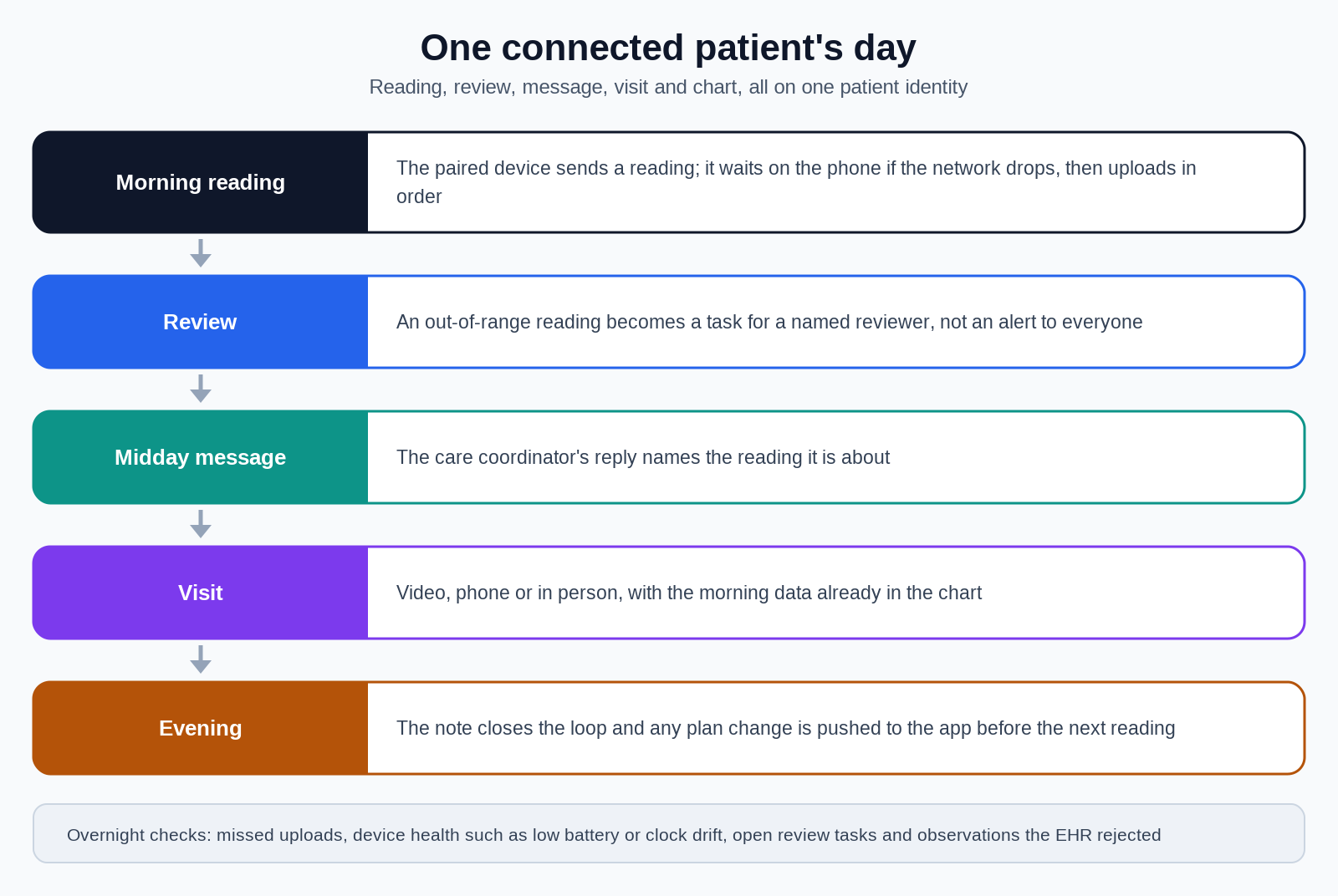
- Morning: a device or a symptom check, stored even if the phone is offline.
- Midday: a message that names the reading it is about.
- Visit: video, phone or in person, with the morning data already in the chart.
- After: the note and the next task, closed or assigned.
How does a morning reading reach the system?
A morning reading reaches the system through the patient's phone or a hub, which receives it from the device, stamps it and uploads it when a connection exists. The engineering work is making sure the reading arrives once, with the right time and the right person attached.
The Bluetooth SIG publishes adopted GATT service specifications for health devices, including the Blood Pressure, Glucose, Health Thermometer, Pulse Oximeter and Weight Scale services.
- Pairing: the device is linked to one enrolled patient, and a swap is recorded rather than silently replaced.
- Timestamps: the device time and the phone time are both stored, because they disagree more often than teams expect.
- Buffering: readings wait on the phone when the network drops, then upload in order.
- Duplicates: a retry carries the same reading id, so the server stores it once.
What happens when a reading is out of range?
An out-of-range reading creates a review task for the care team, using thresholds the clinician set for that patient. It should not send a broadcast alert to everyone, and it should not wait silently until the next visit.
The task names the reading, the threshold it crossed and the person who must look at it. When the nurse acknowledges it, the system records who reviewed it and what they decided, which is the part a later chart review will need.
Thresholds change over time, so store the threshold value that applied when the reading was judged. Otherwise an old task can look wrong after the clinician adjusts the range.
Midday: linking the message to the reading
At midday the patient gets a message, often a check-in from the nurse about the morning number. That message should carry a reference to the reading itself, so both sides are talking about the same value and time.
Build the thread inside the same patient record the readings use, through a secure channel rather than plain text messaging. Track who owns the reply and how long the thread waits, because an unanswered question is where the patient starts to lose trust in the program.
What does the clinician see before the visit?
Before the afternoon visit, the clinician should see a short summary of recent readings, open tasks and the message thread, inside the record they already use. Asking them to open a separate vendor portal is how readings go unseen.
The summary usually reaches the EHR as structured observations through an HL7 FHIR API or an HL7 v2 results interface, depending on what the site supports. The video or phone visit then opens on the same patient identity, so nothing has to be matched by hand.
Evening: how does the chart close the loop?
In the evening the loop closes when the visit note is signed and the next task is either finished or assigned to a named person. The patient should see that next step in plain words, such as a changed reading schedule or a follow-up date.
If the plan changes the thresholds or the device schedule, that change has to flow back to the phone app before the next morning. A plan that exists only in the note leaves the app running yesterday's instructions.
What runs overnight?
Overnight jobs check that the day held together: readings that never uploaded, devices with low battery, tasks left unacknowledged and records that failed to post to the EHR. Each finding becomes a work item for the morning team instead of a log line nobody reads.
- Missed uploads: patients with no reading on a day they were scheduled to take one.
- Device health: low battery, repeated pairing failures or clock drift.
- Open tasks: out-of-range readings still waiting for a reviewer.
- Interface errors: observations the EHR rejected, with the reason.
Who owns each moment of the day?
Each moment needs a named owner on the care side and on the technical side. When a reading goes missing, the patient should not have to work out whether to call the clinic, the device vendor or the app support line.
- Reading: the enrolling nurse owns the schedule, and the platform team owns upload and device health.
- Review task: a care team role owns acknowledgement within the program's agreed window.
- Message: the care coordinator owns the reply, with a fallback when they are away.
- Visit summary: the interface owner makes sure it posts, and the clinician reads it.
- Plan change: the clinician decides, and the platform pushes it to the app.
Caregivers and shared devices
Many connected patients are helped by a spouse, a parent or a home aide, and some share one phone or one cuff across a household. The software has to know which person a reading belongs to and who is allowed to see it.
Give caregivers their own login with a recorded relationship and a scope, rather than sharing the patient's password. On shared devices, ask who is taking the reading before it is saved, and flag a sudden change in values that may mean the wrong person used the cuff.
What does the patient see at each step?
The patient should see, at each step, that something happened and what comes next: the reading was received, a nurse has looked at it, a reply is waiting, the visit is booked. When a reading disappears into silence, the patient has little reason to take the next one, and the program loses the data it was built to collect.
Keep these confirmations short and plain, and avoid showing raw clinical flags the patient cannot interpret. A clear next step does more for adherence than a chart of every value.
How do you test a whole day end to end?
Test the whole day with a scripted synthetic patient who takes a reading, goes offline, answers a message, joins a visit and receives a new plan. Run that script in a test environment connected to an EHR sandbox, and check each record at the end.
The script catches the failures unit tests miss, such as a time zone shift between the device and the chart or a message that lands on a duplicate patient. Run it again after every change to the app, the interface or the thresholds.
Where does the day usually break?
It breaks when the device vendor, the message vendor and the EHR each have a different patient id, or when a reading waits in a portal the clinician does not open. Our store-and-forward guide covers review queues. The RPM MVP post covers standing up the program.
What should the first release include?
One device or one check-in, one clinician view, and a write into the record you already use. A second device and a second message channel can wait until the first reading is visible in the visit.
What are connected patient best practices?
Connected patient best practices keep one identity across every step and make each step leave a record someone can act on: a stored reading, an owned task, a linked message, a visible summary and a plan the app actually follows.
- Link each device to one enrolled patient, and record swaps.
- Store device time and phone time for every reading.
- Send out-of-range readings to a named reviewer, not to everyone.
- Show readings inside the EHR the clinician already uses.
- Push plan changes back to the app before the next reading.
- Run a scripted synthetic day after every release.
How Agnotic can help
Agnotic builds the pieces of a connected day for care teams and product companies: device intake, review queues, linked messaging and the interface into the EHR. We usually start by tracing one real patient journey and fixing the step where the identity or the reading is lost.
Build the connected patient path with Agnotic
We connect devices, review tasks, messages and the chart around one patient record.
Related reading on Agnotic
Monitoring programs, asynchronous review, device data and portals.


